

Hirschmann MS20-0800SAAEHH04.2.04 MICE Switch
Hirschmann MS20-0800SAAEHH04.2.04 MICE Switch
The Hirschmann MS20-0800SAAEHH04.2.04 (Belden Part Number: 943 435-001 base series) is a highly versatile, modular managed industrial Layer 2 switch. Representing the core of Hirschmann’s MICE (Modular Industrial Communication Equipment) product family, this unit serves as a customizable, hot-swappable backplane controller designed for medium-density networking.
Product Introduction / Overview
In complex plant-floor networks, a single, fixed-port configuration rarely remains ideal long term. The MS20-0800SAAEHH04.2.04 bypasses physical port limitations by providing a rugged modular chassis.
Rather than featuring fixed RJ45 or fiber ports, this unit consists of the primary MICE central switch processor combined with a high-speed backplane plate that accommodates two hot-swappable media modules (such as the MM2 or MM3 series). This configuration supports up to 8 Fast Ethernet ports total. Equipped with Layer 2 Enhanced (E) management software and pre-loaded with firmware v04.2.04. this switch brings specialized security, diagnostics, and redundancy straight to the DIN rail.
Technical Table
| Feature / Parameter | Specification Details |
| Model Code | MS20-0800SAAEHH04.2.04 |
| Belden Order Code | 943 435-001 (Configured Chassis Series) |
| Firmware Version | v04.2.04 (Classic Switch Release) |
| Total Modular Capacity | Up to 8 Fast Ethernet ($10/100\text{ Mbps}$) ports |
| Module Slots Available | 2 x slots for MICE media modules (MM2 series) |
| Software Level | Enhanced (E) / Layer 2 Professional features |
| Supported Topologies | Line, Star, Redundant Ring, Dual Ring |
| Redundancy Protocols | HIPER-Ring, MRP (Media Redundancy Protocol), RSTP |
| Operating Voltage | Dual redundant $24\text{ V DC}$ inputs ($18\text{ V}$ to $32\text{ V DC}$) |
| Diagnostic Port | 1 x RJ11 socket for V.24 (RS-232) local console configuration |
| Alarm Output | 1 x Signaling dry-contact relay (max. 1 A @ 24 V DC) |
| Dimensions (W x H x D) | $110\text{ mm} \times 135\text{ mm} \times 111\text{ mm}$ (Standard assembly profile) |
| Weight | Approximately 600 g (excluding plugged-in modules) |
Environmental Tolerance Conditions
Operating Temperature: $0^\circ\text{C}$ to $+60^\circ\text{C}$ ($32^\circ\text{F}$ to $140^\circ\text{F}$)
Storage Temperature: $-40^\circ\text{C}$ to $+70^\circ\text{C}$
Relative Humidity: 10% to 95% (completely non-condensing)
Ingress Protection Rating: IP20 (housed in a rugged, powder-coated aluminum casing)
Shock & Vibration Standards: IEC 60068-2-27 (shock), IEC 60068-2-6 (vibration)
Industry Certifications: CE, FCC, cUL508 (safety), and Germanischer Lloyd (marine classification approvals)
Operating Instructions
1. Software Configuration & Initial IP Assignment
Because the switch ships with an unassigned IP address by default, use one of the following methods to establish contact:
HiDiscovery Utility: Download the free Hirschmann HiDiscovery tool. Connect your PC to any active port on an inserted media module. The tool will locate the switch via its MAC address and allow you to write a static IP directly.
Console Interface: Plug an RJ11-to-DB9 cable into the V.24 diagnostic port. Set your terminal software (e.g., PuTTY) to 9600 baud, 8 data bits, no parity, 1 stop bit, no flow control.
Web GUI Access: Once an IP is set, access the switch via HTTPS. Use the default credentials: Username admin and Password private (this must be changed upon first login).
2. Media Module Assembly
Before sliding the media modules into place, verify that the module connectors are free of dust.
Power down is not required; MICE media modules support hot-swapping.
Align the module rails and push it home. Hand-tighten the upper and lower retaining screws on each module to ensure consistent backplane ground contact.
Fault Diagnosis
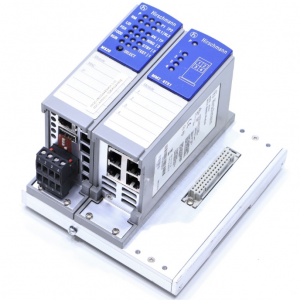
MS20-0800SAAEHH04.2.04
“P” (Power) LED on the front panel is Red:
Cause: One of your two redundant $24\text{ V DC}$ supply loops has lost power.
Remedy: Check the wiring at the terminal block. Ensure that both $V_1$ and $V_2$ input channels are receiving steady DC voltage. If only using a single supply, disable the power alarm in the software to clear the red status.
“RM” (Ring Manager) LED flashes unexpectedly:
Cause: The switch is configured as the Ring Manager for HIPER-Ring, but it detects a physical break in the optical loop.
Remedy: Inspect the status of your fiber uplink ports. Look for dirty connectors or physical breaks on the network lines.
Unable to access the Web GUI:
Cause: Your PC is on a different subnet, or the firmware has blocked HTTP access.
Remedy: Verify your PC’s IP address matches the subnet of the switch. Attempt connection via HTTPS rather than standard HTTP. If locked out, reset the switch to factory defaults via the console CLI.
Related Models of the Same Series
The modular MICE series can scale up in physical size and bandwidth:
MS20-1600SAAE: Features a wider backplane supporting up to 4 media modules (up to 16 Fast Ethernet ports total).
MS30-0802SAAE: A gigabit variant. Features slots for Fast Ethernet modules alongside built-in high-speed gigabit uplink ports (requires MM3 series gigabit modules).
MM2-2FXM2: Compatible dual-port multi-mode SC fiber media module.
MM2-4TX1: Compatible 4-port RJ45 copper media module.
Storage Conditions
Keep the module inside its original static-shielding cardboard box to prevent static damage to the backplane pins.
Temperature Range: Store at temperatures between $-40^\circ\text{C}$ and $+70^\circ\text{C}$.
Store in a dry, clean area with humidity below 95% to protect the internal motherboard components from oxidation.