

Hirschmann SPIDER 4TX/1FX EEC Unmanaged Industrial Switch
Hirschmann SPIDER 4TX/1FX EEC Unmanaged Industrial Switch
The Hirschmann SPIDER 4TX/1FX EEC is an entry-level, unmanaged Industrial Ethernet switch designed for space-constrained, harsh environments. Part of Belden’s legendary SPIDER family, this rugged plug-and-play unit bridges local machine-level copper devices with long-distance fiber optic backbones.
(Note: Actual model features a vertical, slimline plastic housing optimized for high-density cabinet mounting.)
Unique Product Description
The SPIDER 4TX/1FX EEC is the definition of “set-and-forget” industrial networking. Engineered to operate flawlessly without any software configuration, it provides four 10/100Base-TX RJ45 copper ports alongside one 100Base-FX fiber optic port (available in SC or ST multi-mode connectors).
The EEC (Extended Environmental Conditions) rating ensures the internal components are hardened against extreme thermal swings and high humidity, making it an incredibly cost-effective choice for heavy industrial edge applications.
Product Advantages and Features
Extended Temperature Performance (EEC): Operates reliably in extreme temperatures ranging from $-40^\circ\text{C}$ to $+70^\circ\text{C}$ ($-40^\circ\text{F}$ to $158^\circ\text{F}$), making it ideal for outdoor enclosures and unconditioned environments.
Plug-and-Play Simplicity: Requires no configuration or software. It features auto-negotiation, auto-crossing (MDI/MDI-X), and auto-polarity on all copper ports to eliminate commissioning errors.
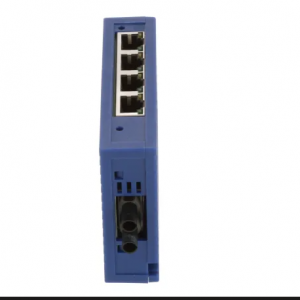
4TX/1FX
Fiber Optic Isolation: The single Fast Ethernet fiber port supports distances up to 5 km (multi-mode), providing complete immunity against electrical noise (EMI) and ground loop issues between distant equipment.
Ultra-Compact Footprint: The slim, space-saving design allows for high-density DIN-rail mounting, maximizing cabinet space in congested control panels.
High Operational Efficiency: Boasts extremely low power consumption (typically under 3W) and a high mean time between failures (MTBF), reducing long-term operational costs.
Related Models
Depending on the specific fiber layout and physical connector standard required, the primary order variations include:
SPIDER 4TX/1FX ST EEC (943 891-001): Features ST (Straight Tip) multi-mode fiber connection ports (up to 5 km).
SPIDER 4TX/1FX SC EEC (943 890-001): Features SC (Subscriber Connector) multi-mode fiber connection ports (up to 5 km).
Other Models in the Same Series
The Hirschmann SPIDER family covers a wide range of port densities and environmental classes:
| Model | Copper Ports | Fiber Ports | Temp Range | Core Focus |
| SPIDER 3TX-TAP | 3 x RJ45 | None | $0^\circ\text{C}$ to $+60^\circ\text{C}$ | Ultra-compact basic networking |
| SPIDER 5TX | 5 x RJ45 | None | $0^\circ\text{C}$ to $+60^\circ\text{C}$ | Standard indoor automation |
| SPIDER II 8TX | 8 x RJ45 | None | $-40^\circ\text{C}$ to $+70^\circ\text{C}$ | High-density unmanaged edge |
| SPIDER II 8TX/2FX EEC | 8 x RJ45 | 2 x Multi-Mode | $-40^\circ\text{C}$ to $+70^\circ\text{C}$ | Dual fiber ring/uplink capability |
Application Cases
1. Wind Turbine Generator Towers
In wind energy installations, the ethernet network must traverse from the nacelle down to the base station. Standard copper limits prevent this run. By mounting a SPIDER 4TX/1FX EEC inside the nacelle, local monitoring sensors (vibration, temperature, pitch control) plug into the copper ports, while the single fiber port runs safely down the tower’s height, completely isolated from the high electromagnetic interference generated by the power lines.
2. Outdoor Traffic Control Cabinets
Traffic signal controllers and roadside CCTV cameras are subjected to extreme seasonal temperatures. The EEC rating allows the switch to operate inside unconditioned roadside enclosures. It aggregates camera feeds locally via copper and transmits the data back to a central fiber ring backbone.
3. Water and Wastewater Pumping Stations
Sprawling outdoor treatment plants require reliable networks over long distances. Utilizing the fiber port, a remote pump station can transmit status and control signals back to the main plant over several kilometers, protecting the network from outdoor surges and lighting strikes.
Installation and Maintenance
[DIN Rail Attachment Hook]
||
\/
====|==== <– Hook upper slot onto standard 35mm rail
|
[SPIDER]
|
====|==== <– Snap bottom latch onto the rail
1. Mechanical Installation (DIN-Rail Mounting)
Hook the Device: Place the upper slot of the integrated DIN-rail clip on the back of the SPIDER housing onto the top edge of a standard 35 mm DIN rail (EN 50022).
Latch It: Push the bottom of the device toward the rail until the plastic latch snaps firmly onto the bottom edge of the rail.
Cabling: Insert your RJ45 copper patch cords into ports 1-4. Pull the black dust caps off the fiber ports and connect your ST or SC multi-mode fiber cables (ensure Tx at one end connects to Rx at the other).
2. Electrical Wiring
Connect the redundant $24\text{ V DC}$ power supply ($9.6\text{ V DC}$ to $32\text{ V DC}$) using the supplied 3-pin plug-in terminal block.
Securely wire the ground connection from the terminal block to the cabinet’s protective earth (PE) system to maximize noise immunity.
3. Maintenance and Troubleshooting
Because the SPIDER series is completely unmanaged, maintenance is minimal:
Check the LEDs:
LS/DA (Link/Data): Green indicates a healthy link; flashing indicates active data traffic.
P (Power): Green indicates correct input voltage is supplied.
Fiber Optic Cleaning: If you experience packet loss or link instability, use a professional fiber cleaning pen to clear dust from the optical transmitter/receiver lenses. Keep unused ports capped.