

HIRSCHMANN RS20-0400M2M2TDAEHC04.0.01 Industrial Switch
HIRSCHMANN RS20-0400M2M2TDAEHC04.0.01 Industrial Switch
The Hirschmann RS20-0400M2M2TDAEHC04.0.01 is an elite, fully managed Layer 2 Fast Ethernet switch belonging to the highly configurable OpenRail family. Designed specifically for localized control networks requiring a mix of fiber and copper cabling, this compact switch features 4 ports in total: 2 standard RJ45 Fast Ethernet ports and 2 multi-mode fiber-optic SC ports.
Equipped with Hirschmann’s HiOS/Classic Standard Software (L2S), it delivers deterministic data transmission, robust ring-redundancy protocols, and enterprise-grade security filters inside a hardened, vibration-resistant housing.
Technical Parameter List
| Technical Parameter | Specification Value |
| Brand / Manufacturer | Hirschmann (A Belden Brand) |
| Model Code / Order No. | RS20-0400M2M2TDAEHC04.0.01 |
| Total Ports | 4 Ports |
| Copper Ports | 2 x 10/100BASE-TX (RJ45 sockets) |
| Fiber Ports | 2 x 100BASE-FX (Multi-Mode, SC fiber optic connectors) |
| Fiber Wave Length | 1300 nm (nanometer) |
| Transmission Distance | Up to 5 km (using 50/125 µm fiber) or up to 4 km (using 62.5/125 µm fiber) |
| Operating Voltage Range | Dual redundant input: 9.6 VDC to 60 VDC (or 18 to 30 VAC) |
| Current Consumption | Max. 230 mA at 24 VDC |
| Power Consumption | Max. 5.6 W |
| Software Level | Layer 2 Standard (L2S Firmware version 04.0.01) |
| Management Interfaces | Web Browser (HTTPS), CLI (Console/SSH), SNMP v1/v2/v3 |
| Housing Protection Rating | IP20 protection class |
| Dimensions (W x H x D) | 47 mm x 131 mm x 111 mm |
| Weight | Approx. 400 g |
Product Features & Core Advantages
Deterministic Redundancy Protocols: Supports Fast MRP (Media Redundancy Protocol) and HIPER-Ring, guaranteeing network recovery times of less than 80 ms in the event of a fiber or copper link failure.
Immunity to Electromagnetic Noise: The 2 integrated multi-mode SC fiber ports act as physical barriers to electromagnetic interference (EMI), ground loops, and lightning surges—ideal for long cable runs between industrial control rooms and high-voltage motor fields.
Comprehensive Industrial Security: Protects control logic networks (such as PLC-to-SCADA lanes) via IP/MAC-based Access Control Lists (ACLs), port security limits, IEEE 802.1X network access control, and password encryption.
Passive Heat Dissipation: Fanless operation combined with high-grade thermal dissipation eliminates mechanical failure points and reduces cabinet dust accumulation.
Auto-Configuration Adapter (ACA): Includes a storage port for an ACA (USB or RJ11 card) allowing users to backup configuration files physically. If a switch fails, the replacement switch reads the backup adapter and boots up fully configured in seconds.
Model Classification
Within the Hirschmann OpenRail RS20 platform, the alphanumeric model naming scheme directly classifies the hardware configuration:
RS20-0400…: Explains the port density (4 Fast Ethernet ports, 0 Gigabit ports).
M2M2…: Denotes fiber port transceiver types: M2 represents Multi-Mode, 100Mbit/s, SC connector style.
T…: Designates Standard industrial operating temperature limits ($0^\circ\text{C}$ to $+60^\circ\text{C}$).
D…: Standard industrial approvals (CE, cUL508. ISA 12.12.01 Class 1 Div 2 for hazardous locations).
AE…: Standard manufacturing, software layer, and hardware assembly profiling.
HC04.0.01: Dictates the pre-installed firmware version platform (Classic Software version 4.0).
Environmental Tolerance Conditions
Operating Temperature: 0°C to +60°C
Storage & Transport Temp: -40°C to +70°C
Relative Humidity: 10% to 95% (Non-condensing)
Conformal Coating Option: No (Standard bare assembly, protected within dry cabinets)
Mechanical Vibrations:
Meets IEC 60068-2-6 standard ($3.5\text{ mm}$ displacement at $2\text{ to }9\text{ Hz}$, $1\text{g}$ acceleration at $9\text{ to }150\text{ Hz}$).
Mechanical Shock Resistance:
Meets IEC 60068-2-27 standard ($15\text{ g}$ peak acceleration, $11\text{ ms}$ pulse width, 18 total pulses).
Mean Time Between Failures (MTBF): 62.4 Years (calculated using MIL-HDBK 217F standard at $25^\circ\text{C}$).
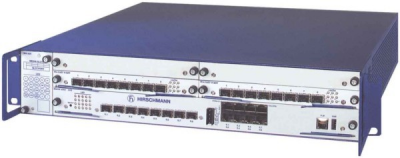
RS20-0400M2M2TDAEHC04.0.01
Installation Method
1.Mount the Switch on the DIN Rail:Ensure secure locking。
Tilt the RS20 switch slightly upward and hook the housing bracket onto the upper flange of the standard 35 mm DIN rail. Pull the unit downward and snap it into position on the bottom edge of the rail until the internal lock snaps shut.
2.Connect Safety Ground (Functional Earth):Prevents electrostatic discharge。
Connect a heavy-duty, low-impedance ground wire (minimum 14 AWG) to the grounding screw located at the bottom front panel of the switch housing. Connect the other end directly to your cabinet’s earth ground bar.
3.Wire the Power Terminal Block:Redundant VDC connection。
Insert positive and negative power cables (9.6 to 60 VDC range) into terminal positions P1 (Power 1) and/or P2 (Power 2 for redundancy) on the 6-pin screw terminal plug. Fasten the screws and insert the terminal block into the top receptacle of the switch.
4.Establish SC Fiber & RJ45 Data Cables:Build physical link pathways。
Plug in your multi-mode fiber patch cables to the TX/RX SC duplex slots (observe TX-to-RX crossover rules). Plug standard category copper cables into the RJ45 interfaces. Verify that link LEDs light up.
Operating Instructions & LED Diagnostics
Initial Connection and Configuration
Physical Console connection: Connect a terminal emulator PC directly to the RS20’s RJ45 console interface using a standard DB9-to-RJ45 adapter cable. Configure the terminal software to 9600 Baud, 8 Data Bits, 1 Stop Bit, No Parity.
Web GUI IP Assignment: Alternatively, run the Hirschmann HiDiscovery software tool to scan for unconfigured MAC addresses across the broadcast domain and assign the switch an IP address matching your local subnet.
Web Management Login: Access the switch via HTTPS in your browser, enter your customized credentials, and navigate the status tree to configure features like VLANs, SNMP traps, and Storm Control.
Diagnostic LED Matrix
Power Indicator (P1 & P2):
Green / On: Respective power supply line is within the healthy voltage threshold ($>9.6\text{ VDC}$).
Off: Voltage source disconnected, broken, or below functional threshold.
Fault Indicator (F):
Off: Normal operation with no errors detected.
Red / Solid: A defined alarm event has occurred (e.g., loss of a redundant power feed, a monitored port link went down, or temperature threshold exceeded).
Ring/Standby Mode (RM):
Green / Solid: The switch is successfully configured and actively running as the active Ring Manager.
Off: Operating as a standard client node within a redundant loop.
Port Status (LNK/ACT):
Green / Solid: A reliable hardware connection link is established on the port.
Green / Flashing: Active packet transmission or reception is occurring.
Off: No cable detected or connected partner device is offline.