

HIRSCHMANN BRS20-0600Z6Z6-STCZ99HHSES Industrial Switch
HIRSCHMANN BRS20-0600Z6Z6-STCZ99HHSES Industrial Switch
The Hirschmann BRS20-0600Z6Z6-STCZ99HHSES is a member of the advanced BOBCAT family of compact, managed Layer 2 Industrial Ethernet switches. Engineered to support the next generation of automation infrastructure, the BOBCAT platform bridges the gap between classic industrial applications and Time-Sensitive Networking (TSN) infrastructure.
Featuring an ultra-modern, robust design, this switch provides 6 ports in total: 4 Fast Ethernet RJ45 ports and 2 SFP transceiver slots supporting raw Fast Ethernet speeds. Operating on Hirschmann’s HiOS (Hirschmann Operating System), it delivers advanced redundancy, strict security baselines, and precise synchronization for real-time industrial applications.
Technical Table
| Technical Parameter | Specification Value |
| Brand / Manufacturer | Hirschmann (A Belden Brand) |
| Model Code | BRS20-0600Z6Z6-STCZ99HHSES |
| Series Designation | BOBCAT Series (BRS) |
| Total Port Count | 6 Ports |
| Copper Ports | 4 x 10/100BASE-TX (RJ45 connectors) |
| Fiber/SFP Ports | 2 x 100BASE-FX (SFP fiber-optic transceiver slots) |
| Operating Voltage | Redundant 12 VDC to 24 VDC inputs (Voltage range: 9.6 to 32 VDC) |
| Current Consumption | Max. 380 mA at 24 VDC |
| Power Consumption | Max. 9.1 W |
| Software Level | HiOS Layer 2 Standard (L2S) |
| Time Synchronization | IEEE 1588v2 PTP (Precision Time Protocol) hardware-supported |
| Housing Protection Class | IP30 rating (Metal/Polycarbonate composite) |
| Dimensions (W x H x D) | 57 mm x 140 mm x 140 mm |
| Mounting | Standard 35 mm DIN Rail mounting |
Environmental Tolerance Conditions
Built to thrive inside crowded control panels subjected to thermal stress, the BRS20 is physically and electrically hardened:
Operating Temperature: 0°C to +60°C (Standard industrial rating)
Storage & Transport Temp: -40°C to +70°C
Relative Humidity: 1% to 95% (Non-condensing)
Conformal Coating: No (Standard bare assembly)
Mechanical Shock Resistance: IEC 60068-2-27 ($15\text{ g}$ peak acceleration, $11\text{ ms}$ pulse width).
Mechanical Vibration Tolerance: IEC 60068-2-6 ($3.5\text{ mm}$ displacement at $2\text{ to }9\text{ Hz}$; $1\text{g}$ acceleration up to $150\text{ Hz}$).
EMC Immunity Standards: Certified to meet EN 61000-4 series requirements for high electrostatic discharge (ESD) immunity, surge, fast transients (bursts), and high-frequency conducted disturbances.
Operating Instructions
1. Initial IP Setup & Configuration
HiDiscovery Tool: Download the free Hirschmann HiDiscovery utility. Connect your commissioning laptop to the same network segment as the switch. The utility scans for the switch’s hardware MAC address and lets you assign an IP address, subnet, and default gateway.
USB-C Console Interface: The front panel features a local USB-C port acting as an out-of-band serial console interface. Connect your PC via a USB-C cable and open a serial terminal emulator (9600 Baud, 8N1) to access the Command Line Interface (CLI).
Web-Based Graphical User Interface (HTML5): Navigate to the assigned IP address in a secure browser (HTTPS). Use the default setup wizard to configure passwords, change SNMP parameters, and establish security options.
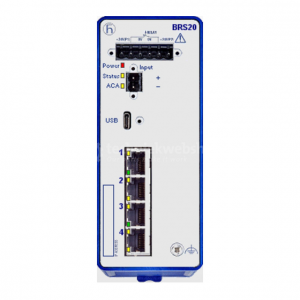
BRS20-0600Z6Z6-STCZ99HHSES
2. Network Redundancy Setup
To establish high-reliability rings:
Navigate to Redundancy > MRP or HIPER-Ring in the web interface.
Select your designated backbone uplink ports (usually the SFP slots, ports 5 and 6).
Define the switch’s role (Ring Manager or standard Client).
Activate the protocol before completing the physical loop to avoid packet storm issues.
Fault Diagnosis
The BRS20 offers comprehensive localized and network-level troubleshooting diagnostic signals:
Front Panel LED Diagnostics
Power Indicator (Power):
Green / On: Unit is receiving healthy voltage within the acceptable 9.6–32 VDC range on at least one input line.
Off: Loss of supply voltage.
Device Status (Status):
Green / On: Device is fully operational and healthy.
Red / Solid: A configured alarm event has triggered (such as link loss on a critical port or redundant power supply line failure).
Red / Flashing: Firmware update or self-test configuration failure.
ACA Active LED:
Green / On: External Auto-Configuration Adapter is detected and functioning.
Off: No ACA adapter connected.
Port-Specific Link/Activity (L/D):
Green / Solid: Physical hardware link is secure.
Green / Flashing: Port is transmitting/receiving Ethernet frames.
Dry Alarm Contact Relay
A physical terminal block on top contains a signaling contact. In normal operations, this dry contact relay remains closed.
If a critical error occurs (such as power failure to input line 1 or a monitored port link disconnect), the relay breaks open. Connect this to a PLC input to instantly alert the plant SCADA system.
Related Models of the Same Series (Hirschmann BOBCAT)
The BOBCAT platform is highly modular, offering a wide array of configurations under the BRS family:
BRS20-0600Z6Z6-STCZ99HHSES: 4 Fast RJ45 + 2 Fast SFP ports (Standard model).
BRS20-0600Z6Z6-S_TCZ99HHSES: Custom-configured with extended temperature ranges ($-40^\circ\text{C}$ to $+70^\circ\text{C}$).
BRS30 Series: Identical physical profile but supports Gigabit speeds on the uplink ports.
BRS40 Series: Supports All-Gigabit speeds across both copper and fiber ports for bandwidth-heavy application networks.
Storage Conditions
Proper storage ensures long-term reliability and prevents early degradation of delicate optical and terminal contacts:
Temperature Range: Keep strictly within the limits of $-40^\circ\text{C}$ to $+70^\circ\text{C}$.
Moisture Control: Maintain Relative Humidity under $95\%$, ensuring a stable environment with no moisture condensation.
Storage Preparation: Store in original static-shielded packaging inside a clean, dry, and dust-free storage container. Keep terminal connectors capped until the moment of field installation.