

HIRSCHMANN RS2-3TX/2FX EEC Industrial Ethernet Switch
HIRSCHMANN RS2-3TX/2FX EEC Industrial Ethernet Switch
The Hirschmann RS2-3TX/2FX EEC (Order No. 943771-001) is a highly ruggedized, unmanaged industrial Ethernet rail switch. Engineered to provide reliable plug-and-play network expansion in demanding physical settings, it features a specialized hybrid port configuration with both copper twisted-pair and multi-mode fiber-optic ports.
With its EEC (Extended Environmental Character) certification, this switch is structurally and thermally hardened to withstand extreme environmental swings, making it a preferred choice for roadside traffic enclosures, wind turbines, substations, oil and gas fields, and marine deployments.
Technical Parameter List
| Technical Parameter | Specification Value |
| Brand / Manufacturer | Hirschmann (A Belden Brand) |
| Model Code | RS2-3TX/2FX EEC |
| Order Number | 943 771-001 |
| Total Port Count | 5 Ports |
| Copper Ports | 3 x 10/100BASE-TX (RJ45 sockets) |
| Fiber Ports | 2 x 100BASE-FX (Multi-Mode, SC duplex interfaces) |
| Fiber Wave Length | 1300 nm (nanometer) |
| Transmission Range | Up to 5 km (using 50/125 µm fiber) or up to 4 km (using 62.5/125 µm fiber) |
| Operating Voltage Range | Dual redundant input: 9.6 VDC to 32 VDC (or 18 to 30 VAC) |
| Current Consumption | Max. 260 mA at 24 VDC |
| Power Consumption | Max. 6.3 Watts |
| Signaling Contact | 1 x Dry Relay Alarm Contact (Max. 1 A at 24 VDC) |
| Housing Protection Class | IP20 rating (Metal/Polycarbonate hybrid case) |
| Dimensions (W x H x D) | 47 mm x 135 mm x 111 mm |
| Weight | Approx. 270 g |
Product Features & Core Advantages
Hardened Climate Resilience (EEC): Rated to perform continuously without failure-prone active cooling fans in severe thermal conditions ranging from -40°C to +70°C.
Zero-Configuration Simplicity: Fully unmanaged “plug-and-play” architecture. Works immediately out of the box with no software installation or network setup required.
Fiber-Optic Isolation Protection: The two integrated multi-mode SC fiber ports allow high-speed, long-distance data transmission while isolating network segments from heavy electromagnetic interference (EMI), ground loops, and transient surges.
Redundant Power Infrastructure: Dual power terminal inputs operate with a wide 9.6 to 32 VDC voltage tolerance, protecting communications against localized power supply or cabling failures.
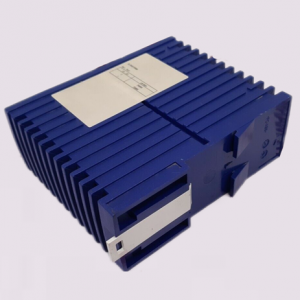
RS2-3TX/2FX
Smart Ethernet Copper Ports:
Auto-Crossing: Automatically identifies and adapts to crossover or straight-through Ethernet cables.
Auto-Negotiation & Auto-Polarity: Automatically syncs with the exact transmission speeds and wiring configurations of the connected nodes.
Model Classification
The Hirschmann RS2 series of unmanaged switches is classified by thermal thresholds, physical ports, and fiber transceiver variations:
Standard Temperature Series (0°C to +60°C):
RS2-3TX/2FX (943732-001): Designed for standard climate-controlled indoor control cabinets.
Extended Temperature Series (-40°C to +70°C – EEC):
RS2-3TX/2FX EEC (943771-001): Thermally hardened for severe, unconditioned outdoor field cabinets (This Model).
Single-Mode Fiber (Long-Haul) Series:
RS2-3TX/2FX-SM EEC (943772-001): Configured with Single-Mode SC fiber ports for transmission distances extending up to 30 km.
Environmental Tolerance Conditions
Operating Temperature: -40°C to +70°C (EEC rating)
Storage & Transport Temp: -40°C to +70°C
Relative Humidity: 10% to 95% (Non-condensing)
Mechanical Vibrations: Meets IEC 60068-2-6 standard ($3.5\text{ mm}$ displacement at $2\text{ to }9\text{ Hz}$, $1\text{g}$ acceleration at $9\text{ to }150\text{ Hz}$).
Mechanical Shock Resistance: Meets IEC 60068-2-27 standard ($15\text{ g}$ peak acceleration, $11\text{ ms}$ pulse width).
Hazardous Area Standards: ATEX Zone 2 approval (II 3G Ex nA IIC T4 Gc) and ISA 12.12.01 Class 1 Division 2 certification.
Installation Method
1.Mount the Switch onto the DIN Rail:Standard 35 mm DIN Rail。
Hook the upper slot on the rear of the RS2 switch onto the upper edge of your standard 35 mm DIN rail. Pull down on the lower latch and snap the bottom portion of the switch onto the rail until it locks firmly.
2.Establish Safety Earthing (Grounding):Static Protection。
Connect a solid earthing copper conductor (minimum 14 AWG) to the ground terminal screw on the bottom-front panel of the switch housing. Connect the other end directly to your panel’s common earth bar.
3.Wire the Power Terminal Block:9.6 to 32 VDC。
Strip the insulation of your VDC power lines. Insert them into the positive and negative screw terminals (P1 and P2 for redundancy) on the 5-pin pluggable terminal connector block. Secure the screws and plug the block into the top power input port.
4.Connect Copper & Fiber Data Ports:RJ45 & Duplex SC。
Insert your category copper cables into the three RJ45 ports. Connect your multi-mode optical fiber lines into the duplex SC ports (Ports 4 and 5), ensuring correct transmit (TX) and receive (RX) crossover.
Operating Instructions & Diagnostics
Because the RS2-3TX/2FX EEC is unmanaged, network troubleshooting relies on its integrated physical indicators and DIP switches:
DIP Switch Configurations (Front Panel)
DIP Switch 1 (Fault Relay): Enables or disables the physical alarm relay signaling loop.
DIP Switches 2 to 5: Links specific port monitoring (Ports 1 through 5) to the fault relay. When active, if a monitored port link goes down, the alarm relay triggers.
Diagnostic LED Matrix
| LED Indicator | Color / State | Operational Meaning |
| Power (P) | Green / Solid | Redundant power inputs are active and within safe operational limits ($>9.6\text{ VDC}$). |
| Off | Power input disconnected or voltage levels are below functioning thresholds. | |
| Fault (F) | Off | Normal operation with no active alarm conditions detected. |
| Red / Solid | A monitored port link has dropped, or a redundant power line has lost voltage. | |
| LNK/ACT (Ports) | Green / Solid | A reliable hardware connection link is established on the port. |
| Green / Flashing | Data packets are actively transmitting or receiving on the port. | |
| Off | Cable disconnected, broken, or the connected partner device is offline. |