

HIRSCHMANN RS20-0400M2T1SDAPHC08.0.01 Managed Switch
HIRSCHMANN RS20-0400M2T1SDAPHC08.0.01 Managed Switch
The Hirschmann RS20-0400M2T1SDAPHC08.0.01 is an industrial-grade, fully managed Fast Ethernet switch from the classic OpenRail RS20 series. It features a compact, hardened housing optimized for space-saving DIN rail cabinet setups.
With its tailored port configuration consisting of both copper RJ45 interfaces and a multimode fiber-optic uplink, this switch is designed to bridge field devices over extended distances without risking signal degradation from electromagnetic interference (EMI).
Technical Table
Below are the exact technical specifications mapped to the configuration code RS20-0400M2T1SDAPHC08.0.01:
| Technical Parameter | Specification Value |
| Brand / Manufacturer | Hirschmann (A Belden Brand) |
| Full Model Code | RS20-0400M2T1SDAPHC08.0.01 |
| Product Description | Managed Industrial Fast Ethernet Switch |
| Total Ports | 4 Ports |
| Port Types | 3x RJ45 (10/100BASE-TX) + 1x Multimode Fiber (100BASE-FX, SC connection) |
| Transmission Distance | Multimode fiber: up to 5 km (50/125 µm fiber) or 4 km (62.5/125 µm fiber) |
| Software Version | HiOS / Classic Software (Release 08.0.01) |
| Management Class | Managed, Enhanced (Security and advanced redundancy protocols enabled) |
| Operating Voltage | Dual redundant 12 V DC to 48 V DC inputs |
| Current Consumption | Approx. 0.23 A at 24 V DC |
| Housing Dimensions | 47 mm x 135 mm x 111 mm (W x H x D) |
| Mounting | 35 mm DIN Rail mounting |
| Protection Standard | IP20 |
Environmental Tolerance Conditions
Built for heavy-duty industrial environments, the RS20 switch functions reliably under extreme field conditions:
Operating Temperature Range: Standard operating temperature from 0 °C to +60 °C.
Relative Humidity: 10% to 95% (strictly non-condensing).
Vibration Resistance: Evaluated to IEC 60068-2-6 guidelines (exhibiting stability at 1 mm amplitude, 2 Hz to 13.2 Hz).
Mechanical Shock Resistance: Evaluated to IEC 60068-2-27 guidelines (15 g, 11 ms duration).
EMC Immunity: Certified against electrostatic discharge (EN 61000-4-2) and electromagnetic field interference (EN 61000-4-3).
Storage Conditions
To preserve the internal electrical layers, capacitor life, and port contacts of your spare modules prior to deployment, adhere to these storage constraints:
Storage Temperature: -40 °C to +70 °C.
Surrounding Atmosphere: Clean, dry, and dust-free. Corrosive gases (such as sulfur or chlorine) must be avoided to prevent micro-corrosion of copper contacts and fiber ferrules.
Maximum Storage Humidity: Less than 95% relative humidity (non-condensing).
Operating Instructions & Commissioning
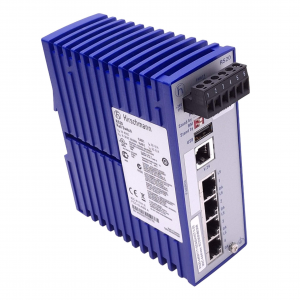
RS20-0400M2T1SDAPHC08.0.01
1. Power and Ground Setup
Connect your redundant DC power sources to the 6-pin terminal block situated at the top of the switch housing. Connect a heavy-gauge copper wire to the grounding screw located at the bottom-right corner of the front metal faceplate to discharge transient voltages.
2. Physical Connections
Insert your standard RJ45 Ethernet patch cables (Cat5e or better) into the copper ports.
Uncap the SC fiber-optic port and connect your multimode duplex fiber cable. Ensure the TX (transmit) and RX (receive) paths are appropriately crossed between nodes.
3. IP Assignment & Diagnostics
The switch does not contain a default IP address out-of-the-box. Run the Hirschmann HiDiscovery utility on your connected computer to scan the local network broadcast domain, locate the switch via its hardware MAC address, and assign your subnet’s designated static IP address.
Fault Diagnosis (LED Matrix)
The front panel of the switch features a distinct set of LED indicators designed for rapid troubleshooting inside the control cabinet:
| LED Label | Status | Meaning | Action Required |
| P (Power) | Off | No operating voltage detected on either input. | Check terminal block wiring and external DC power supplies. |
| Green | Power supply voltage is normal on at least one input. | None (Normal operation). | |
| F (Fault) | Red | A hardware fault, link failure, or power supply loss on a redundant line has occurred. | Log into the Web Interface to check the exact alarm register. |
| Off | System status is healthy. | None. | |
| LS (Link/Data) | Off | No physical network link detected on that specific port. | Inspect the RJ45 or SC fiber cabling, connection integrity, and the far-end device power. |
| Green Flashing | Physical link is established and active data frames are moving. | None. |
Related Models of the Same Series
The Hirschmann OpenRail RS20 family offers a wide range of configuration variants depending on port requirements:
RS20-0800T1T1SDAU: 8-port copper-only switch (8 x 10/100BASE-TX), Managed.
RS20-1600T1T1SDAE: 16-port high-density copper switch, standard environmental rating.
RS20-0400M2M2SDAP: 4-port switch featuring 2 copper ports and 2 multimode SC fiber ports for ring topology networks.
RS30 Series: Identical compact form factor, but integrates Gigabit Ethernet uplink ports for high-throughput trunking.