

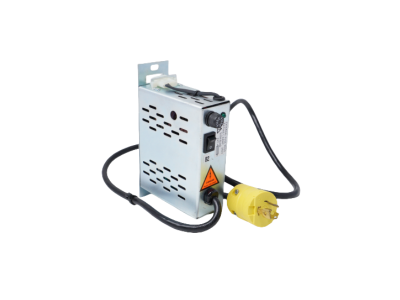
Honeywell LCN‑E Hub Power Supply 38500148‑300
LCN‑E Hub Power Supply 38500148‑300
display on the screen, press HELP. This display appears with the OPER* target, but
without the SUPV and ENGR targets. You can select OPER* to change to the operator
keyswitch level.
11232
To change to supervisor or engineer keyswitch level, select the TOUCH HERE TO ENTER
PASSWORD target, key in the password, and press ENTER. If you use an Engineer’s
Keyboard, you must use capital letters. If you are in the Universal Personality and want to
go from operator keylock level to engineer keylock level, press PF1 on the Engineer’s
Keyboard.
SUPV or SUPV and ENGR targets appear. Select the desired access level. The “THIS
STATION IS:” line changes to indicate the new keyswitch level.
The prebuilt passwords in systems shipped from the factory are TDC3000 SUPV and
TDC3000 ENGR (be sure to key in the space). You can call up the display as schematic
KEYLOCK.
The line that reads, “*MAY BE VIEW. CHECK ACCESS-CHG TARGET ON CONS-STATS
DISPLAY,” reminds users that in Network Configuration, under System Wide Values, the
Default Access Level for this US may have been configured as VIEW (no database changes
allowed), rather than OPER, so selecting OPER results in the VIEW level. To verify the
actual keyswitch level for this US, call up the Console Status display and check under the
ACCESS heading
38500148‑300
• Alarm annunciation policies
It is relatively easy to make changes to the Area Database (for more information, see 4.8),
but to make such changes effective it necessary to reload the new, modified Area Database.
In some situations, a US may from time-to-time need to operate in a different process area,
using a different Area Database. To reload a modified Area Database or to change to a
different Area Database, use the following procedure.
5.3.2.1 How to Change the Area Database
1. At a US running the Operator Personality, on the Console Status display select AREA
CHANGE, then select the target for the new area or the area whose database has been
modified. A new display appears with targets to select the default Area Database source
(NET = HM) or the alternate source (cartridges).
2. If the Area Database is on the HM (normally, it will be), select NET. Otherwise, select
ALTERNATE SOURCE and select the cartridge drive with the Area Database.
3. Select EXECUTE COMMAND. AREA CHANGE IN PROGRESS appears and after
several seconds the Console Status display reappears.
5.3.3 Keyswitch Access Levels
All functions that can change data within the Enhanced Micro TDC3000 System are
assigned by Network Configuration, or by the system, to one of these keyswitch access
levels:
• Operator
• Supervisor
• Engineer
| ABB | NTAC-02 |
| GE | IC695ACC302-AB |
| ABB | UNITROL1010 |
| Honeywell | 05704-A-0145 |
| ABB | SCADA 560CMU05 |
| ABB | SCADA 560PSU01 |
| ABB | 3BHE035301R0003 UNITROL1010 |
| ABB | IS220UCSAH1A |
| Bässler | DEcS-150 |
| Bässler | DM110 |
| METSO | ACN CS D201925 |
| ABB | UNITROL1010 |
| ABB | 560PSU01 |
| ABB | 560CMU05 |
| ABB | S+ HN800/CW800 Cable 4.0 M, SPK800‑04 |
Universal Stations on other TDC 3000X Systems have a 3-position keyswitch. The ability
of an individual to change the position of the keyswitch, and therefore, to have the ability to
change certain types of data, depends on the key he or she holds. Engineer keys can move
the switch to any position, supervisor keys can move it to the Operator and Supervisor
positions, and the key can be removed only in the Operator position.
Because a keyswitch is not provided on the Enhanced Micro TDC3000 System, a
password-protected display is provided to allow authorized people to change the keyswitch
(access) level. The content of the display is affected by the password used. Those with
operator-access authority are given no password, those with supervisor-access authority
are given a supervisor-access password, and those with engineer-access authority are given
an engineer-access password