

HIRSCHMANN 943824-002 SPIDER 5TX Industrial Ethernet Switch
HIRSCHMANN 943824-002 SPIDER 5TX Industrial Ethernet Switch
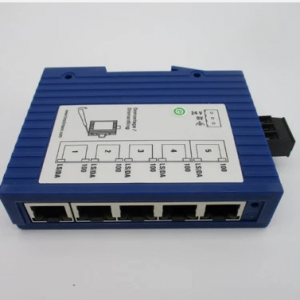
The Hirschmann 943824-002 (also known as the SPIDER 5TX) is an entry-level, unmanaged industrial Ethernet rail switch. Designed for space-sensitive and demanding automation environments, this robust, plug-and-play unit provides highly efficient data routing for small industrial networks.
Technical Parameter List
| Parameter | Specifications & Value |
| Brand / Manufacturer | Hirschmann (Belden Brand) |
| Model / Order No. | SPIDER 5TX / 943824-002 |
| Port Count & Type | 5 x 10/100BASE-TX (RJ45 Fast Ethernet ports) |
| Input Voltage Range | 9.6 VDC to 32 VDC (Standard 24 VDC input) |
| Current Consumption | Max. 100 mA at 24 VDC |
| Power Consumption | Max. 2.2 W (7.5 Btu/h at 24 VDC) |
| MAC Address Table | Learns up to 1,000 addresses |
| Transmission Range | 0 to 100 meters (using Twisted Pair copper cable) |
| Enclosure Rating | IP30 protection class |
| Dimensions (W x H x D) | 25 mm x 114 mm x 79 mm (Ultra-slim housing) |
| Weight | Approx. 113 g |
| MTBF | 123.7 Years (MIL-HDBK 217F) |
Product Features & Core Advantages
Plug-and-Play Simplicity: Requires zero configuration or management software. Simply mount, connect power, and plug in Ethernet cables.
Advanced TP/TX Port Intelligence:
Auto-Negotiation: Automatically adjusts transmission speeds (10 or 100 Mbit/s).
Auto-Crossing: Detects and adapts to straight-through or crossover cables, removing cabling guesswork.
Auto-Polarity: Automatically corrects swapped receive lines ($RD+$ and $RD-$).
Store-and-Forward Technology: Buffers incoming frames, validates checksums, and filters out corrupted or invalid packets before forwarding.
Compact, Space-Saving Footprint: At only 25 mm wide, it maximizes DIN rail density, leaving more room for PLCs and I/O modules.
High Efficiency & Low Heat: Consuming a maximum of 2.2 W, it generates very little thermal stress inside closed control cabinets.
Model Classification
The Hirschmann SPIDER unmanaged switch lineup is classified primarily by port density, fiber optic options, and temperature ratings:
Standard Temperature Series (0°C to +60°C):
SPIDER 5TX (943824-002): 5 x RJ45 copper ports (This Model).
SPIDER 8TX (943376-001): Expanded 8 x RJ45 copper ports version.
Extended Temperature Series (EEC: -40°C to +70°C):
SPIDER 5TX EEC (943824-102): Identical port configuration but designed for extreme thermal outdoor cabinets.
Fiber Optic Media Converter Hybrid Series:
SPIDER 4TX/1FX: Features 4 RJ45 copper ports and 1 Multi-Mode Fiber (SC/ST connector) port for longer distance backhaul.
Environmental Tolerance Conditions
Operating Temperature: 0°C to +60°C
Storage/Transport Temp: -40°C to +70°C
Relative Humidity: 10% to 95% (Non-condensing)
943824-002
Mechanical Stability:
Shock Resistance: IEC 60068-2-27 (15 g, 11 ms duration, 18 shocks).
Vibration Resistance: IEC 60068-2-6 (3.5 mm amplitude at 3–9 Hz; 1g at 9–150 Hz).
EMC Interference Immunity:
ESD: EN 61000-4-2 (6 kV contact discharge, 8 kV air discharge).
Surge Protection: EN 61000-4-5 (2 kV power line, 1 kV data line).
Installation Method
1.Mount onto the DIN Rail:Ensure firm lock。
Position the top slot of the SPIDER 5TX housing hook onto the 35 mm DIN rail (DIN EN 50022). Push the bottom of the device toward the rail until the plastic latch clicks firmly into place.
2.Establish Protective Grounding:Safety First。
Connect a ground wire to the designated ground screw on the housing. Always connect the ground first before wiring power to protect against electrostatic damage.
3.Wire the Power Terminal:9.6 to 32 VDC。
Strip the power cables and insert them into the 3-pin plug-in terminal block. Tighten the terminal screws. Ensure the polarity is correct (positive, negative, and ground) before plugging the block into the top socket.
4.Connect RJ45 Data Ports:Fast Ethernet。
Connect your industrial devices (PLCs, HMIs, or I/O cards) to any of the 5 ports using standard twisted-pair Ethernet cables. The auto-crossing and auto-negotiation protocols will automatically build the link.
Operating Instructions & LED Diagnostics
Because the unit is unmanaged, its operation is purely monitored via the integrated front-facing LED diagnostics:
Power LED (P):
Green / On: Unit is receiving power within the 9.6–32 VDC threshold.
Off: No power supply or voltage drops below the functional threshold.
Link/Data LED (LNK/ACT next to each port):
Green / Solid: A stable Ethernet link is established with the connected device.
Green / Flashing: Active transmission/reception of data frames.
Off: No device connected, or cable is faulty.
Data Rate LED (10/100):
Yellow / On: Port is running at 100 Mbit/s.
Off: Port is running at 10 Mbit/s (or link is down).
Operational Warning: The SPIDER 5TX does not support ring topology protocols (like MRP or RSTP). Connecting these ports in a physical loop without external loop management will cause a network broadcast storm and crash the local segment