

CTI 2500-TAP RS485 Network Tap
2500-TAP RS485 Network Tap
ADD TO CART
CTI 2500-TAP RS-485 network taps can be used for construction a remote I/O network.
These taps use an impedance-controlled design for highest noise immunity and include built-in termination resistance which can be easily switched in- or out- of the circuit using a toggle switch.
They also include an electrical noise bleed path to chassis ground which can improve the noise immunity of your network.
Description
The 2500-TAP Remote I/O Network Tap is specially
design for attaching trunkline and dropline sections to
create 2500 Series remote I/O networks. These taps
use an impedance-controlled design for highest noise
immunity and include built-in termination resistance
which can be easily switched in- or out- of the circuit
using a toggle switch. They also include an electrical
noise bleed path to chassis ground which can
improve the noise immunity of your network.
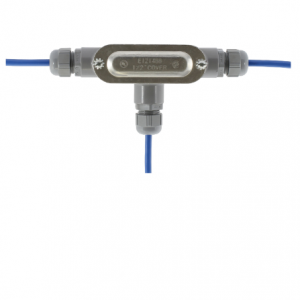
2500-TAP
Features
• Dust and water resistant installation
• Impedance controlled design
• Built in terminating resistance
• Electrical noise bleed system for improved noise
immunity
Installation Instructions
1. Strip back 38mm (1.5 in) of the sleeving on both
ends of the cable. There are three wires exposed
when the sleeving is stripped back. Two wires
have color-coded insulation jackets and one (the
shield) is bare.
2. At both ends of the cable, remove 0.13 in.(3.3
mm) of each color-coded insulation jacket (both
ends) to expose the bare wires.
Connecting the Trunkline or Dropline to the tap
1. Loosen three terminal screws on the terminal
block.
2. Insert the stripped wires being careful to observe
the proper + / – / S location.
NOTE: Ensure that the bare shield wire is not
touching the metal housing of the tap.
NOTE: Throughout your installation, make
connections carefully to prevent wire mismatches.
Before beginning your wiring, select your color code
for + and -, and be sure to follow the code in each tap
connec-tion and each RBC connection.
3. Tighten the screws on the terminal block.
4. If this tap will be an “end” tap in the network
(requires a terminating resistor), be sure to flip
the 3 position switch from the OFF position to
either the 120ohm or 150ohm position,
depending on the cable type being used