

Woodward: easYgen-3200XT (P1/LT) 8440-2083
Woodward: easYgen-3200XT (P1/LT) 8440-2083
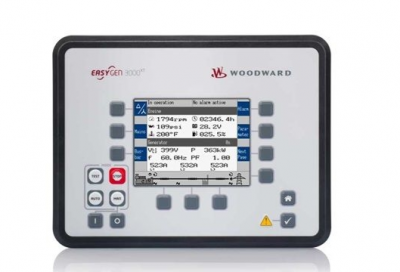
Fig. 5: Front Panel, Overview of Functional Groups of easYgen-3000XT with plastic housing
A Softbutton Group “Display”
B Button Group “MODE”
C Softbutton Group “Operation”
D Softbutton Group “Navigation”
E “Home” (screen) button
F Group “ALARMS” (sign and button)
G LCD Display (Screen)
The softbutton groups A, C, and D provide the following functions
via context-sensitive softkeys:
A “Display”- Change the method of voltage and power calcu
lations displayed.
C “Operation”- Used to perform manual operation of the genset
and the breakers (Single Line Diagram).
Sometimes used for settings’ input.
D “Navigation”- Navigation between system and configuration
screens, and alarm list.
Fig. 6: Front panel of easYgen-3000XT with plastic housing
1..7. 11..13 SoftKey Buttons; momentary function
visible in “Display” (20)
11..13 SoftKey Buttons controlling system via
Single Line Diagram (if visible)
8 HOME Button: Back to main screen
with one click only
9..10 Warning sign (illuminated by warning)
and alarm acknowledge button
14..19 Button Group “Modes”
8440-2083
14. 15. 18.
19
MODE selectors, illuminated
14 STOP MODE
15 MANUAL MODE
16 STOP prime mover in MANUAL
MODE
17 START prime mover in MANUAL
MODE
18 AUTO MODE
19 TEST MODE
20 Display
The display shows context-sensitive softkey symbols, the Single
Line Diagram, measuring values, monitoring values and graphs,
modes of operation, (graphic) equations of LogicsManager (LM)
and AnalogManager (AM), and alarms
Four “Home Screen” display alternatives are available:– Generator– Generator/Mains– Generator/Busbar– Generator/Engine– The “selection” of the displayed parameters is depending
on softbutton [display mode]
n “Home Screen” Generator values are:– Voltage, power, frequency, power factor, and three currents
n “Home Screen” Generator/Mains values are:– The mains is indicated with voltage, power, frequency,
power factor, and current– The generator is indicated with voltage, power, frequency,
power factor, and three currents
n “Home Screen” Generator/Busbar values are:– The busbar is indicated with voltage and frequency– Additionally the generated active- and reactive power of all
easYgens (in the same segment) are displayed
n “Home Screen” Generator/Engine values are:– Engine speed (rpm)– Oil pressure (bar or psi)– Water temperature (°C or °F)– Operating hours (h)– Battery voltage (V)– Fuel level (%)
n Two display brightness levels can be switched by Logics
Manager. Can be used for e.g.:– Key activation determined– Brightness reduction on navigation bridge (vessels)– Saving energy
Find menu: “Parameter è Configure HMI
è Configure display”
n Lock keypad function is determined by LogicsManager
Find menu (ToolKit only!): “Parameter è Configure HMI
è Configure display”
The illuminations indicate the following states:
“Buttons”- 14: operation mode STOP active (blinking if speed
detected)
15: operation mode MANUAL active
18: operation mode AUTOMATIC active
19: operation mode TEST active (starts blinking 5
seconds before TEST mode with timer exceeds)
“ALARMS”- 10 (Warning sign triangle):
Slow blinking (about once per second): Alarm mes
sages are active and not acknowledged in the con
trol unit.
Fast blinking (about 6 times per second): Internal
copy process after flashing a software update is still
running or load the default settings is initiated.
Permanently illuminated: Alarm message is
acknowledged (horn reset) but still pending.
All buttons are illuminated during the boot process of the device.
NEW and updated features
n The “Home Screen” button provides an one-click-jump back to
the overview starting point
Two customizable softbuttons [1] and [2]
n allow own indications to display engine and auxiliary values, for
example.
Find menu: “Parameter è Configure HMI
è Configure customer screen x”
n (full access via ToolKit only; name/description cannot be
changed via HMI)
LEDs Indicate State of Metal Housing Variant
The metal housing variant is coming with two DUO LEDs red/
green/orange (orange = red/green simultaneously):
“Communication” for visualizing communication state:– Off: no data received by any CAN port– Toggling green/off: any data is received by any CAN port– Red:
missing member alarm is active– Toggling red/green: missing member is active and data
received by any CAN port
n “Operation” for device state indication:– Off: the unit is not ready for operation (depending on
LogicsManager “Ready for operation)– Green: the unit is ready for operation and no alarm is active
or latched– Toggling green/red: the unit is ready for operation and a
warning alarm in the system is active or latched– Red: the unit is ready for operation and a shutdown alarm
in the system is active or latched.– Green blinking fast (about 6 times per second) and red is
permanently off: Internal copy process after flashing a soft
ware update is still running or “Load default settings” is initi
ated
| ABB | KD2406PTBX |
| ABB | 60.13.9.024.0040 |
| ABB | 55.34.9.024.0040 |
| ABB | 90.21 |
| ABB | DIL EM-01-G |
| ABB | E-UK |
| ABB | IEC/EN 60947 |
| ABB | 704.910.5 |
| ABB | 704.910.4 |
| ABB | LDMUI-01 61320946C |
| ABB | XVC724BE102 3BHE009017R0102 |
| ABB | UFC921A 3BHE024856P201 |
| ABB | UAC389 HIEE410506P104 |
| ABB | BN5930 |
| ABB | NTAC-02 58967441E |
| ABB | CT-APS.22 1SVR630180R3300 |
| ABB | SZ4127.000 |
| ABB | GRBTU-01 3BSE013175R1 |
| ABB | RM302024 |
| ABB | RM602024 |
| ABB | LT2005-S/SP19 |
| ABB | B09261 |